IQ for TD Insight Response - Infoblox Cloud
This Playbook is part of the Infoblox Threat Defense with DDI Pack.#
Supported versions
Available on Cortex XSOAR (versions 6.5.0 and later) and Cortex XSIAM.
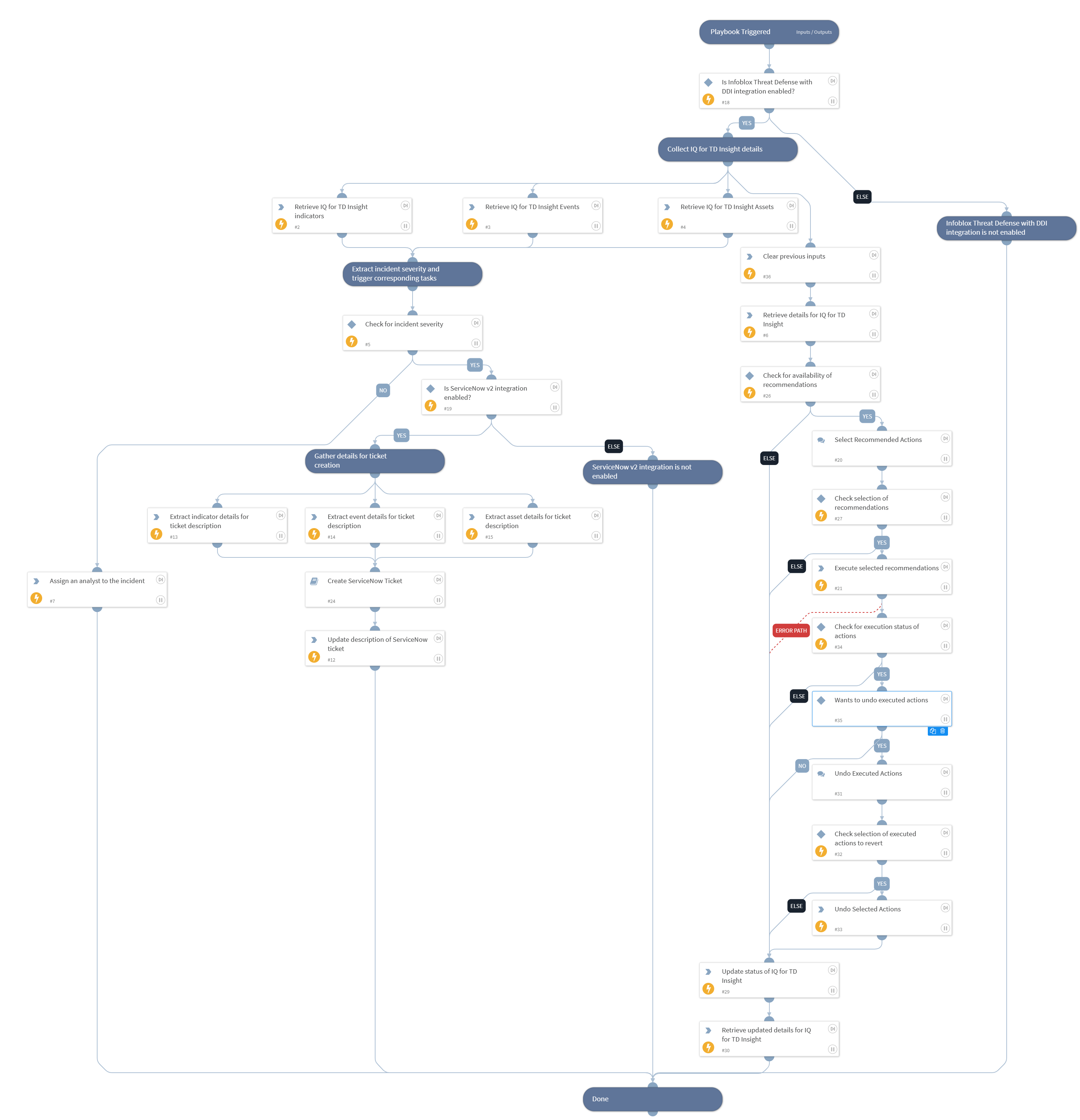
Collects the insight's full detail (including AI-generated recommendations), indicators, assets, and events. Executes the insight's pending recommendation actions along with undo option. If incident severity is Low, notifies the SOC and assigns an analyst; if severity is Medium, High, or Critical, creates a ServiceNow ticket. Updates the insight's workflow status on Infoblox at the end of the run.
Dependencies#
This playbook uses the following sub-playbooks, integrations, and scripts.
Sub-playbooks#
- Create ServiceNow Ticket
Integrations#
This playbook does not use any integrations.
Scripts#
- AssignAnalystToIncident
- DeleteContext
- Exists
- SetAndHandleEmpty
Commands#
- infobloxcloud-iq-for-td-insight-action-execute
- infobloxcloud-iq-for-td-insight-action-undo
- infobloxcloud-iq-for-td-insight-asset-list
- infobloxcloud-iq-for-td-insight-event-list
- infobloxcloud-iq-for-td-insight-get
- infobloxcloud-iq-for-td-insight-indicator-list
- infobloxcloud-iq-for-td-insight-status-update
- servicenow-update-ticket
Playbook Inputs#
| Name | Description | Default Value | Required |
|---|---|---|---|
| insight_id | Collect IQ for TD Insight ID from incident. | incident.infobloxcloudinsightid | Optional |
| incident_severity | Collect incident severity from incident. | incident.severity | Optional |
| limit | No of indicators, events or assets to fetch for the provided IQ for TD Insight. | 50 | Optional |
| onCall | Set to true (case-insensitive) to assign only the user that is currently on shift. Default is False. | false | Optional |
| insight_status | Workflow status to set on the insight at the end of the run. | Needs Review | Optional |
Playbook Outputs#
There are no outputs for this playbook.
Playbook Image#