Manage Private App Segment - Netskope
This Playbook is part of the Netskope - Direct to Zero Trust Pack.#
Supported versions
Available on Cortex XSOAR (versions 6.10.0 and later) and Cortex XSIAM.
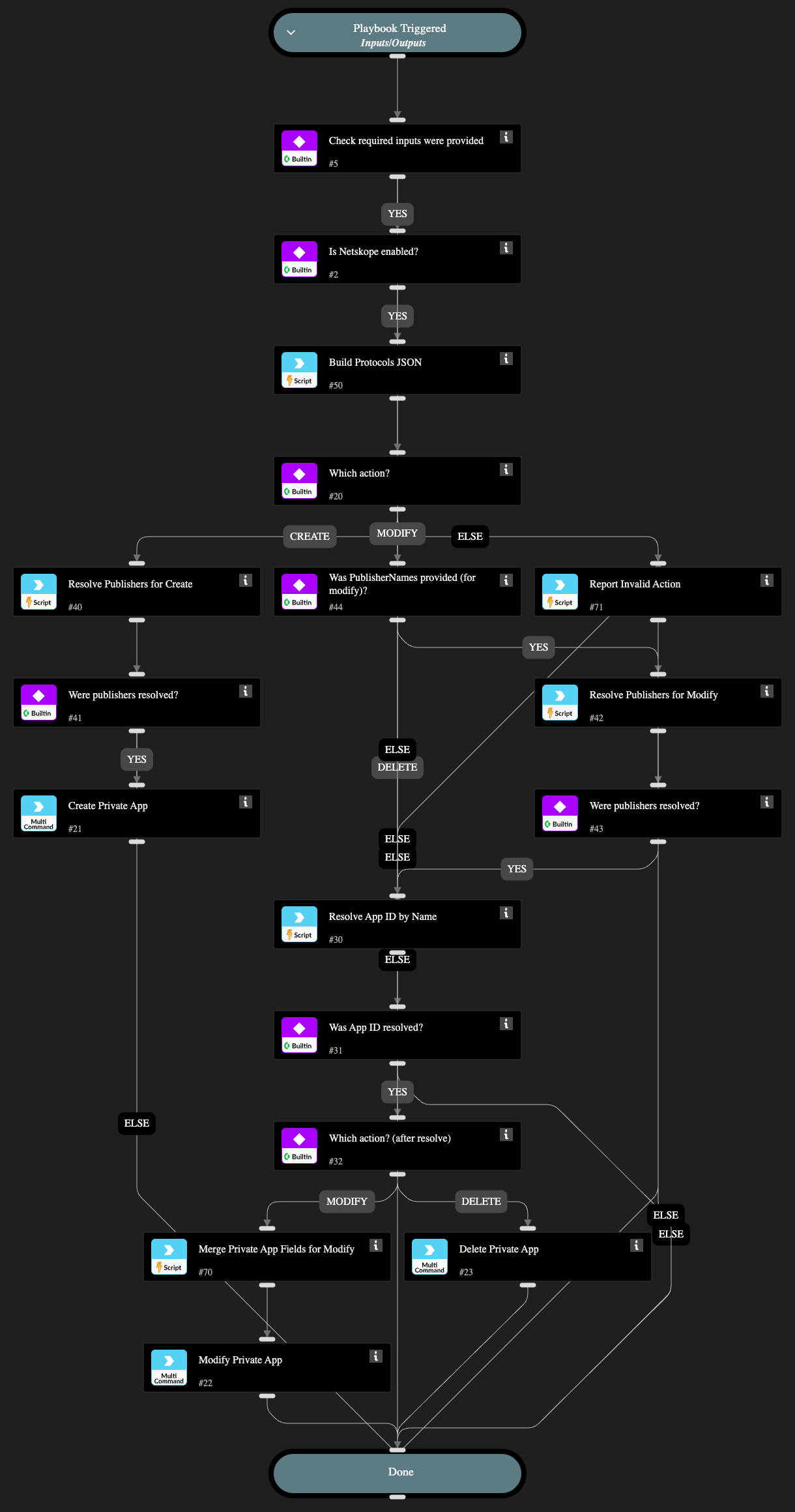
Creates, modifies, or deletes a Netskope private application (ZTNA/NPA) "segment" (Netskope's own API models this as one Private App object: a host + its protocol/port entries + publishers, per /api/v2/steering/apps/private/{private_app_id} - there is no separate "segment" sub-resource in the API, so this playbook manages the whole private app object).
Checks whether the Action input was provided, checks whether a Netskope integration instance is enabled (matching any brand name containing "Netskope"), then branches on Action:
- "create": creates a new private app using AppName, Host, Ports/ProtocolType, PublisherNames, and Tags.
- "modify": updates an existing private app (identified by AppID, or by AppName - see below) - only the fields you provide among AppName/Host/Ports/PublisherNames/Tags are changed, the rest are left as-is. HostsToAdd/PortsToAdd/TagsToAdd append to the current host/protocols/tags instead of replacing them; HostsToRemove/PortsToRemove/TagsToRemove remove specific values from the current host/protocols/tags instead of requiring you to retype everything else. The playbook fetches the app's current state and applies these merges before the PATCH is sent.
- "delete": permanently deletes the private app identified by AppID or AppName.
The playbook uses the modify operation for partial updates and supports adding or removing individual field values without replacing the whole object.
For modify/delete, you can provide AppID directly, or leave it blank and provide AppName instead - netskopev2-list-private-apps has no name filter argument, so the playbook fetches every private app and resolves AppName to an ID itself (also handling the "[app_name]" bracket-wrapping Netskope applies in list responses). If no app or more than one app matches that name, the playbook stops with a clear error rather than guessing.
Similarly, PublisherNames takes plain publisher names (e.g. "AWS-NPA") instead of requiring you to already know each publisher_id - netskopev2-list-publishers also has no name filter, so the playbook resolves each name and builds the {"publisher_id": ..., "publisher_name": ...} JSON array the create/update commands expect.
Ports takes a comma-separated list of port numbers. The playbook builds the object array expected by the create and update commands, which validate that protocols is an array of objects. Host already accepts multiple comma-separated values directly (e.g. "10.0.0.1,10.0.0.2") - no lookup or building needed for that one.
Dependencies#
This playbook uses the following sub-playbooks, integrations, and scripts.
Sub-playbooks#
This playbook does not use any sub-playbooks.
Integrations#
- NetskopeV2
Scripts#
- NetskopeBuildProtocolsJson
- NetskopeMergePrivateAppFields
- NetskopeResolvePrivateAppId
- NetskopeResolvePublishers
- PrintErrorEntry
Commands#
- netskopev2-create-private-app
- netskopev2-delete-private-app
- netskopev2-update-private-app
Playbook Inputs#
| Name | Description | Default Value | Required |
|---|---|---|---|
| Action | Required. Must be create, modify, or delete. Any other value produces an explicit error and no Netskope command is run. | Required | |
| AppID | ID of the existing private app to modify or delete. Optional for Action=modify/delete if AppName is provided instead - netskopev2-list-private-apps has no name filter, so the playbook fetches all apps and resolves AppName to an ID itself (fails clearly if no app or more than one app matches that name). Ignored for Action=create. | Optional | |
| AppName | Name of the private app. Required for Action=create. For Action=modify, either leave blank to keep the current name, or use it (with AppID blank) to look up which app to modify by name. For Action=delete, provide this (with AppID blank) to look up which app to delete by name. | Optional | |
| Host | IP address or hostname of the private app segment - comma-separated for multiple hosts (e.g. "10.0.0.1,10.0.0.2" or "webserver.local,192.168.0.1"), Netskope accepts this directly. Required for Action=create, optional for Action=modify (leave blank to keep the current host). | Optional | |
| Ports | Comma-separated port numbers (e.g. "443,8080,22"). The playbook builds the required protocol object array. Required for Action=create; optional for Action=modify (leave blank to keep the current protocols). | Optional | |
| ProtocolType | Transport protocol applied to every port in Ports (e.g. "tcp" or "udp") - all ports share this one type. Also used for any newly added ports in PortsToAdd. Defaults to "tcp". | tcp | Optional |
| HostsToAdd | Action=modify only. Comma-separated hosts to add to the app's existing host list (e.g. "10.0.0.5") without discarding the current ones. Unlike Host (which replaces the whole field), this is additive. Leave blank to keep the host unchanged. | Optional | |
| PortsToAdd | Action=modify only. Comma-separated ports to add to the app's existing protocols (e.g. "8080") without discarding the current ones. ProtocolType is used for new entries. Unlike Ports (which replaces the whole field), this is additive. Leave blank to keep protocols unchanged. | Optional | |
| HostsToRemove | Action=modify only. Comma-separated hosts to remove from the app's existing host list (e.g. "10.0.0.5") without discarding the rest. Leave blank to keep the host list unchanged. | Optional | |
| PortsToRemove | Action=modify only. Comma-separated ports to remove from the app's existing protocols (e.g. "8080") without discarding the rest. Leave blank to keep protocols unchanged. | Optional | |
| PublisherNames | Comma-separated publisher names (e.g. "AWS-NPA"). The playbook fetches publishers and resolves each name, so publisher IDs are not required. Required for Action=create; optional for Action=modify (leave blank to keep the current publishers). | Optional | |
| Tags | Comma-separated tag names to associate with the app, for policy matching. Optional for both Action=create and Action=modify. For Action=modify, this replaces the app's entire tag list - to add or remove individual tags without discarding the rest, use TagsToAdd/TagsToRemove instead (those take priority over Tags when provided). | Optional | |
| TagsToAdd | Action=modify only. Comma-separated tags to add to the app's existing tags (e.g. "test") without discarding the current ones. Unlike Tags (which replaces the whole field), this is additive. Leave blank to keep tags unchanged. | Optional | |
| TagsToRemove | Action=modify only. Comma-separated tag names to remove from the app's existing tags without discarding the rest. Leave blank to keep tags unchanged. | Optional |
Playbook Outputs#
There are no outputs for this playbook.
Playbook Image#