Panorays Finding - Triage and Response
This Playbook is part of the Panorays Pack.#
Supported versions
Available on Cortex XSOAR (versions 6.10.0 and later) and Cortex XSIAM.
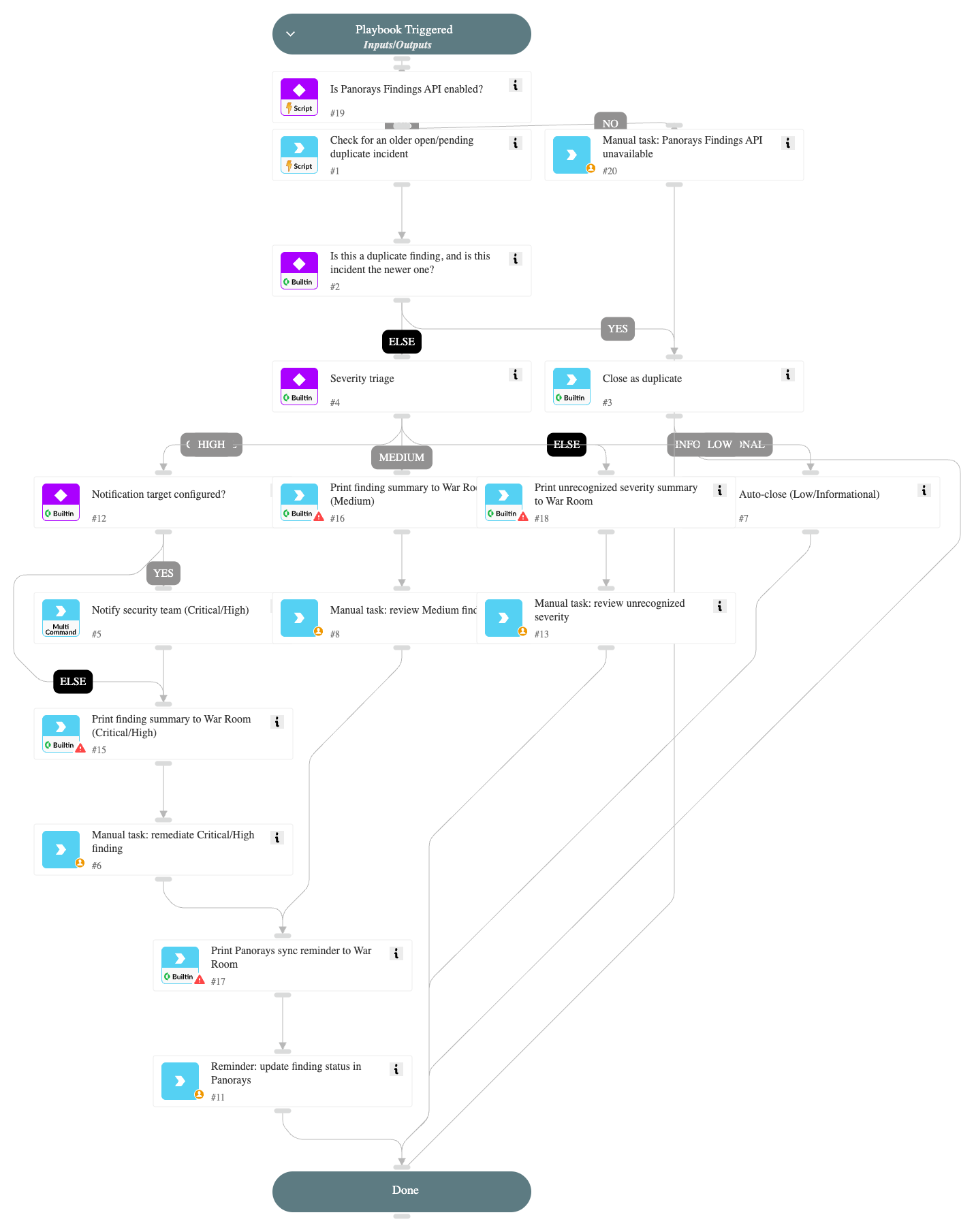
Triages a Panorays "Self Company" finding incident end-to-end without depending on any specific external ITSM tool.
Flow:
- Verifies the Panorays Findings API integration instance is enabled. If it is not, the incident is routed to a manual review task instead of being triaged automatically against an unreachable integration.
- Checks for an existing open (or pending) incident on the same Panorays Finding ID. If found, only the newer of the two incidents (by incident ID) closes itself as a duplicate, so two near-simultaneous incidents for the same finding can't both close in favor of the other.
- Branches on finding severity.
- Low / Informational (INFO): auto-closed, no action required (closeReason/closeNotes configurable via inputs).
- Medium: a Cortex XSOAR task is created for an analyst to review, after a summary is printed to the War Room.
- Critical / High: a notification is sent (via whatever chat integration implementing the generic send-notification command is enabled - e.g. Slack, Microsoft Teams, Mattermost; email-only integrations such as Gmail/EWS are not covered) and a remediation task with an SLA is created natively in Cortex XSOAR, after a summary is printed to the War Room.
- Any other/unexpected value (including empty): a summary is printed to the War Room and the incident is routed to a manual review task instead of being auto-closed, since this field is free-form text from the API with no normalization.
- Remediation is tracked entirely with native Cortex XSOAR tasks - this pack does not assume a specific external ticketing product. See the README for how to extend this playbook with your own ITSM hand-off.
- Reminds the analyst to update the finding status back in Panorays once resolved (a future panorays-finding-update command can automate this step).
- All paths converge on a final "Done" task.
Dependencies#
This playbook uses the following sub-playbooks, integrations, and scripts.
Sub-playbooks#
This playbook does not use any sub-playbooks.
Integrations#
This playbook does not use any integrations.
Scripts#
- IsIntegrationAvailable
- PanoraysCheckOlderDuplicate
Commands#
- closeInvestigation
- send-notification
Playbook Inputs#
| Name | Description | Default Value | Required |
|---|---|---|---|
| NotificationTarget | Recipient for Critical/High severity notifications (email address, Slack/Teams channel, or user - whichever matches the notification integration you have enabled). Leave empty to skip notification and rely on the manual remediation task alone. | Optional | |
| AutoCloseReason | closeReason used when auto-closing Low/Informational severity findings. Align this to your own close-reason taxonomy if needed. | Resolved | Optional |
| AutoCloseNotes | closeNotes used when auto-closing Low/Informational severity findings. | Auto-closed by playbook - low/informational severity, no remediation required. | Optional |
| DuplicateCloseReason | closeReason used when auto-closing this incident as a duplicate of an already-open incident. | Duplicate | Optional |
| DuplicateCloseNotes | closeNotes used when auto-closing this incident as a duplicate of an already-open incident. | Auto-closed by playbook - duplicate of an already-open incident for Panorays Finding ID ${incident.panoraysfindingid}. | Optional |
Playbook Outputs#
There are no outputs for this playbook.
Playbook Image#