Search And Delete Emails - Microsoft Graph Security
This Playbook is part of the Microsoft Graph Security Pack.#
Supported versions
Available on Cortex XSOAR (versions 6.10.0 and later) and Cortex XSIAM.
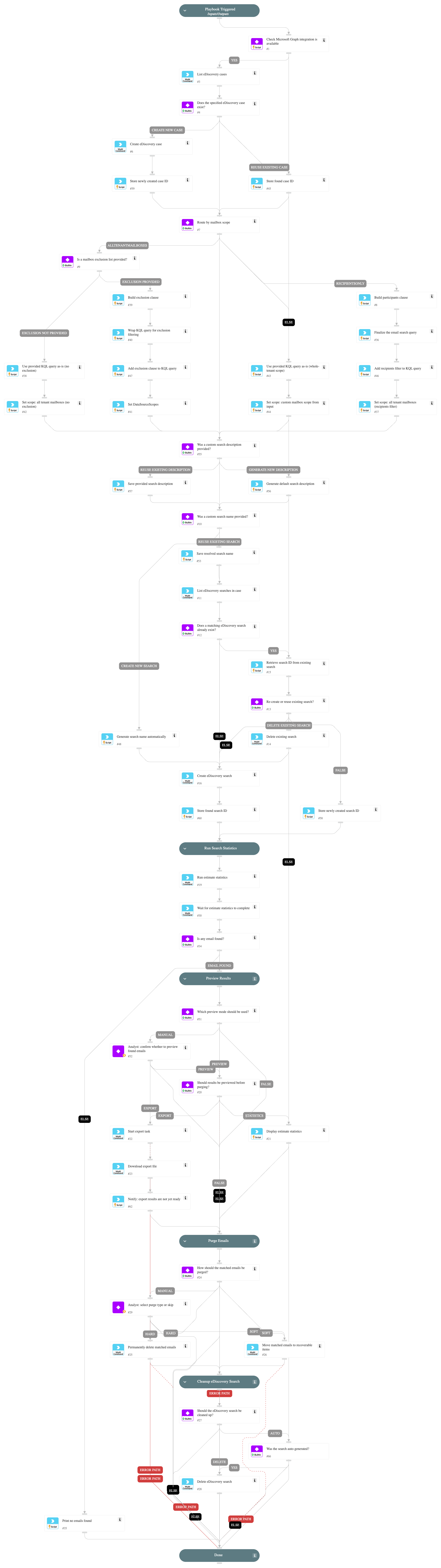
This playbook performs the following steps:
- Checks that the Microsoft Graph integration is available and active.
- Lists existing eDiscovery cases and finds the specified case, or creates it if missing.
- Composes the KQL content query based on the mailbox scope (recipientsOnly, allTenantMailboxes, or other).
- Creates a new eDiscovery search with the composed query, or reuses an existing search based on the force input.
- Runs an estimate statistics operation to count emails matching the query.
- Waits for the estimate operation to complete and checks whether any emails were found.
- Optionally previews the results (statistics summary or full export), based on the preview input.
- Purges the matching emails (Hard delete / Soft delete / manual analyst approval).
- Cleans up the eDiscovery search based on the cleanup input.
Dependencies#
This playbook uses the following sub-playbooks, integrations, and scripts.
Sub-playbooks#
This playbook does not use any sub-playbooks.
Integrations#
- MicrosoftGraphSecurity
Scripts#
- IsIntegrationAvailable
- Set
Commands#
- msg-create-ediscovery-case
- msg-create-ediscovery-search
- msg-delete-ediscovery-search
- msg-export-result-ediscovery-data
- msg-get-last-estimate-statistics-operation
- msg-list-case-operation
- msg-list-ediscovery-cases
- msg-list-ediscovery-searchs
- msg-purge-ediscovery-data
- msg-run-estimate-statistics
Playbook Inputs#
| Name | Description | Default Value | Required |
|---|---|---|---|
| case | eDiscovery case to use. Looked up by name; created if missing. | XSOAR Auto Phishing | Required |
| mailbox_scope | One of: recipientsOnly, allTenantMailboxes, allCaseCustodians, allCaseNoncustodialDataSources, allTenantSites. Drives data_source_scopes and KQL composition. | recipientsOnly | Optional |
| mailbox_exclusion | CSV of mailboxes to exclude. Honored only when mailbox_scope=allTenantMailboxes. | Optional | |
| kql | KQL query identifying the emails to search/delete. Additional clauses are composed around it depending on mailbox_scope. | Required | |
| recipients | CSV of email addresses. Required when mailbox_scope=recipientsOnly. Optional when mailbox_scope=allCaseCustodians. | Optional | |
| search_name | When provided, plays into the force semantics (force=true delete-and-recreate, force=false reuse). When omitted, an auto-name like XSOAR-Search-${incident.id}-${ts} is generated. | Optional | |
| description | eDiscovery search description. Defaults to "Created by XSOAR for incident ${incident.id}" when empty. | Optional | |
| force | Only meaningful when search_name is provided. true ⇒ delete-and-recreate. false ⇒ reuse existing. | false | Optional |
| preview | "true" / "false" / empty=manual. Whether to pause for analyst review before delete. | true | Optional |
| preview_mode | "statistics" (count + size from estimate) or "export" (run export job, download report). | statistics | Optional |
| export_format | File format for the export when preview_mode=export. "msg" produces individual .msg files inside a ZIP (preferred for analyst review). "pst" produces a single PST archive. Ignored when preview_mode=statistics. | msg | Optional |
| delete_type | "Hard" / "Soft" / empty=manual (also lets analyst pick Skip). | Optional | |
| cleanup | "auto" / "true" / "false". auto ⇒ delete the search only if it was auto-generated. | auto | Optional |
Playbook Outputs#
There are no outputs for this playbook.
Playbook Image#